 8505b7e9e0
flux.vision, tobias.raayoni-last.com and randogoth.com. They were one site until
October 2026, serving four audiences from a single dated list, which is the only
format that can hold unrelated things at once.

flux.vision is recovered from the Wayback Machine, where it had sat since being
deleted in 2021: 90 articles, closed and maintained rather than updated.
tobias.raayoni-last.com is the professional record, 97 articles back to 1999.
randogoth.com is the technical work, 41 articles across six areas, served as an
ANSI bulletin board.

History starts here deliberately. The development history, the 266-row inventory
that records why each article went where it did, the Wayback pipelines, the
pruned articles, the source archives and the full-size images are kept beside
the repo rather than in it, so a clone is the web presence and not the argument
that produced it. REFACTOR.md is gitignored for the same reason. See README.md
for where that material lives, and keep it: the sort is not reproducible from
these three directories alone.

Each site documents itself in its own README, including the traps that cost time
and look like nothing when you get them wrong.
5.4 KiB
Executable file
Title: long live the hero Category: MACHINES Date: 2011-07-04 14:29 Slug: long-live-the-hero Tags: android, geeksauce, english Thumb: /library/4823086947_e1bb39d526.jpg
in mid 2009 i bought a HTC Hero (GSM) smartfone and i was amazed by the endless possibilites. but soon the first glitches happened, it crashed, froze, wifi stopped working, i wasn't able to charge it anymore, and i had it sent in for repair and maintenance twice.
i started to be annoyed by this fone i spent so much money on because it seemed that most flaws it had resulted from operating system and software bugs.
eventually i flashed a custom ROM on it (VillainROM 12.0.0) which took days of research, including having an unusable fone for two days, but i managed to get it to work. it was definetly an improvement. the interface was not as slow as before and everything worked flawlessly. but over time i got more and more frustrated by the lack of speed of my gadget. seeing other newer HTC smartfones and the iPhone and how much snappier they ran i started considering to sell my HTC Hero because i was tired of waiting for the user interface all the time because it hung itself up.
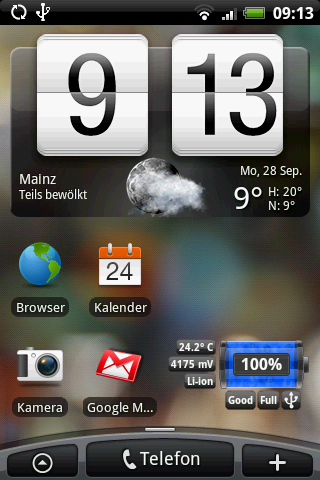
(Hero running Android 1.5)
recently i saw a samsung galaxy mini in action and i was quite impressed about it's speed and snappiness compared to my Hero that was supposed to have the same cpu power (~600Mhz ARM). the big difference between the two fones is the operating system. while my Hero was stuck on Android 1.5 the galaxy mini has Android 2.2 Froyo which runs incdredibly fast and has many new features and much better usability details i was always missing on my Hero.
doing some quick research i stumbled upon a newish release by my favorite custom ROM geeks: FroydVillain 1.7.3-R2
- Android 2.2 for the HTC Hero! i gave it a shot and dug out my old bookmarks of tutorials how to flash a custom ROM.
the first boot of my FroydVillain Hero took a long time, but when the interface was up and after i played around with it for a while i was stunned and happy that my old Hero has become considerably faster and much easier to use with the *much* improved new operating system. everything works like a charm, much more reliable than before, plus the custom ROM is a rooted Android opening the doors to cpu overclocking and network tethering!
finally my HTC Hero is what it was meant for - a snappy and usable mini communication hub that's fun to use! so if you own a Hero and are annoyed by it, try to flash it with Android 2.2+ before you ditch it. It's definetly worth it!
Here's a quick guide on how to do it the fastest and easiest way - ON YOUR OWN RISK!
1. Backup your Data, Media and Applications with a backup app (MyBackup
e.g.)
2. Download and install a file manager from the market (Astro File
Manager or FS File Manager)
3. Download Universal Androot from here and
put the UniversalAndroot.apk on your SD card.
4. Make sure you have "unknown sources" ticked in the Android
application installation settings.
5. Open your installed file manager and browse to UniversalAndroot.apk
and install it.
6. Open the Universal Androot application and choose "Superuser for
Android 1.5~1.6" then choose "Root"
7. Wait until it says "Woot ! Your device is rooted !" and exit the
program. (on my phone it was only "rooted" until i rebooted, after i
always had to apply the rooting which was only valid until the next
reboot)
8. Download and install ROM Manager by Clockwork from the market.
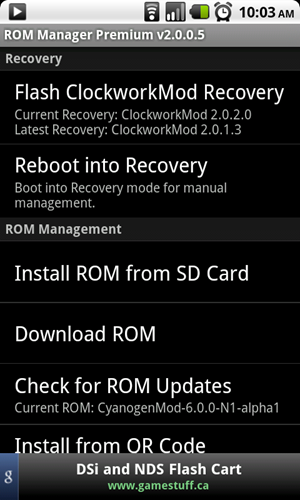
(ROM Manager)
9. Open ROM Manager and grant superuser permissions when prompted.
10. In ROM Manager click "Flash ClockworkMod Recovery" and wait until
it is finished flashing.
11. Run the "Flash ClockworkMod Recovery" flasher *again* to make
sure it is really flashed!
12. Download FroydVillain
1.7.3
and save it on your SD card.
13. Backup the contents of your SD card to your computer!
14. Turn off your phone.
15. Turn it back on holding down HOME and POWER. (keep HOME held down
for 15sec)
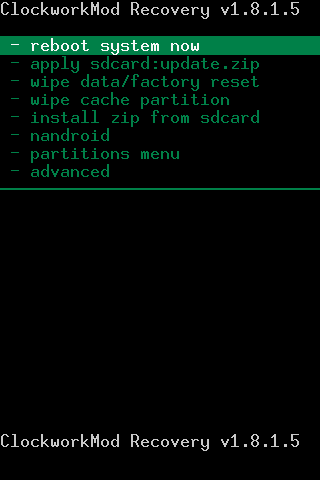
(Clockwork Recovery)
16. You should now boot into Clockwork Recovery (if you don't, repeat
steps 6 - 16)
17. Select Backup/Restore > Nand backup > confirm with Home > Wait
until it's done.
18. select Wipe from the main menu, then select Wipe data/factory reset
and confirm.
19. select Wipe cache and confirm.
20. select Wipe Dalvik-cache and confirm
21. Go back to main menu (back button) and select "Flash Zip from SD
Card".
22. Browse to the Froyd1.7.3-R2-signed.zip file you downloaded onto
your SD card in step 12.
23. Select the file and confirm.
24. Wait until it's done, ignore the errors, and reboot.
25. Rebooting will take a bit longer than usual and you will be greeted
by the FroydVillain splash screen.

(Android 2.2 in action)
Congratulations, you now have a rooted Froyo based HTC Hero!
Enjoy!